
Software I use, gadgets I love, and other things I recommend.
Over 13 years of building software, I’ve fallen in love with a handful of tools, machines, and pieces of hardware that genuinely make me feel sharper and more productive. This is the short list — the stuff that earned its place by surviving years of daily use.
Workstation
14” MacBook Pro, Apple M4 Pro, 48GB RAM (November 2024)
My daily driver, running macOS Tahoe 26.3. The M4 Pro chews through heavy Rails test suites and local LLM inference without ever spinning up the fans. 48GB is the sweet spot for keeping a few containers, a database, and a 7B model resident at the same time.
MSI MEG 342C QD-OLED, 34” ultrawide
QD-OLED ultrawide. The contrast and color make code, terminals, and dark-mode editors look ridiculous, and the 34” ultrawide footprint is the sweet spot for keeping an editor, a browser, and a terminal side by side without window management gymnastics.
Keychron Q3 Max (QMK/VIA, Wireless)
Fully custom mechanical keyboard — gasket-mounted aluminum, hot swappable, QMK/VIA flashable, and wireless when I want to move it around. After years of rubber-dome and low-profile boards, going back to a proper mechanical with QMK firmware was the productivity upgrade I didn’t know I needed.
Logitech MX Vertical Advanced Ergonomic Mouse (Graphite)
Vertical mouse with a 57° angle that puts your wrist in a natural handshake position. After years of wrist strain from regular mice, switching to this fixed it within weeks. Looks weird, feels right after a day of getting used to it.
FlexiSpot E5 standing desk
Electric sit-stand desk with memory presets. Switching between sitting and standing a few times a day is the cheapest ergonomic improvement I’ve ever made — and the memory presets mean I actually use it instead of leaving it parked in one position.
Sony WH-1000XM5
Best-in-class active noise cancellation and the audio quality to match. Wear them all day, forget the world exists, get the work done.
Ergohuman Elite 2
After spending years cycling through cheaper chairs that all eventually wrecked my back, the Ergohuman Elite 2 was the upgrade that stuck. Mesh back, adjustable everything, and the kind of lumbar support that lets me forget the chair exists during a long coding session — which is exactly what you want from a chair.
Homelab
Terramaster F4-424 (modified)
4-bay NAS that I upgraded to 16GB RAM. Compact, quiet, sips power, and has enough headroom to run a stack of containers alongside the storage workload without breaking a sweat.
Unraid OS
The right OS for a homelab that grows over time. Mixed-size disks with parity protection, painless Docker container management, and VMs when you need them. I’ve tried alternatives — keep coming back to Unraid because nothing else makes day-to-day operations this easy.
Storage: 24TB Seagate IronWolf + 2× 1TB NVMe cache
24TB of Seagate IronWolf for the bulk array, with two NVMe cache pools (Samsung 990 EVO Plus and WD_BLACK SN770) sitting in front. Hot writes and appdata land on the NVMe so container restarts and database workloads stay snappy; the nightly mover handles the rest.
Development tools
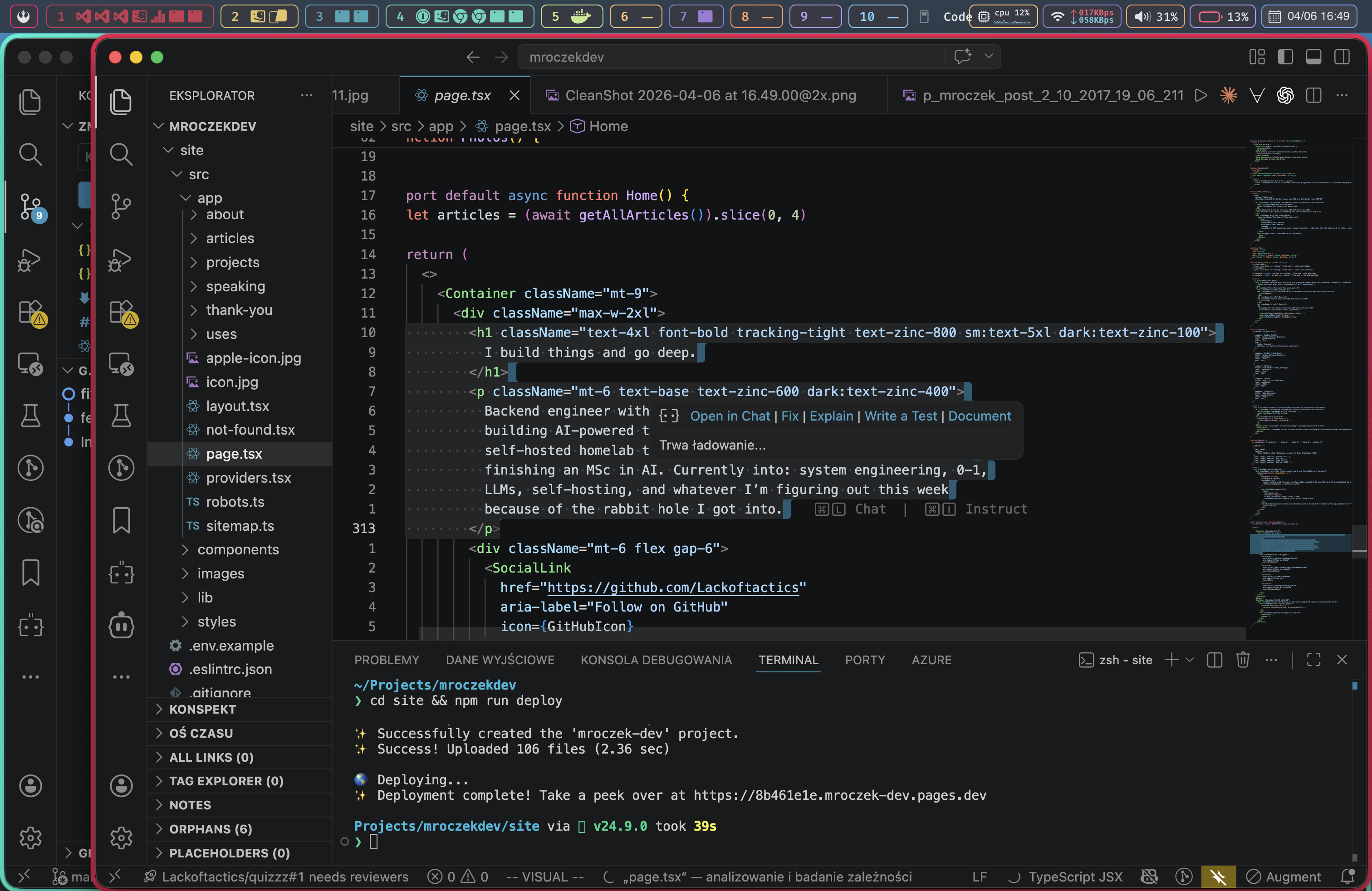
VS Code with Vim emulation
The compromise that finally stuck. Vim keybindings for editing speed, VS Code for the ecosystem of extensions, debuggers, and language servers. Best of both worlds without the years of config wrangling.
Claude Code
Lives in my terminal and acts as a genuine pair-programmer for anything from refactors to one-shot scripts to debugging odd production behavior. The quality jump over autocomplete-style AI tools is hard to overstate.
Warp
A terminal that actually feels like it was built this decade. Blocks instead of an endless scrollback, real autocomplete, and built-in AI for the commands you only need to run twice a year and always forget. Before Warp I was on WezTerm, which is still excellent if you want a fully scriptable, GPU-accelerated terminal you can configure to the bone.
My workflow
Productivity
AeroSpace
i3-style tiling window manager for macOS. Workspaces, splits, and keyboard-driven layouts without the SIP-disabling pain that comes with yabai. After years of dragging windows around, going keyboard-only feels like cheating.
SketchyBar
Fully scriptable replacement for the macOS menu bar. Pairs with AeroSpace to show workspace indicators, system stats, and anything else I want at a glance — exactly the data I care about, none of the noise I don’t.
Raycast
Application launcher, clipboard history, snippets, window management, AI commands, and a small army of extensions. Replaced half a dozen menu-bar apps and I still keep finding new things it does well.